A phishing URL is carefully crafted to appear trustworthy at first glance, but closer inspection often reveals subtle inconsistencies. In many cases, attackers manipulate domain names by introducing slight spelling variations or replacing characters with similar-looking alternatives. For example, a lowercase “L” may be replaced with an uppercase “I,” creating a domain that appears correct but is actually fraudulent. In other situations, additional words are inserted into the domain to create a false sense of security, such as including terms like “secure,” “verify,” or “login.” These additions are intended to convince users that the link is official. Attackers also rely on complex subdomains that push the real domain further back in the URL structure, making it harder to notice. While the link may include “https,” this alone does not guarantee safety, as many phishing sites now use secure certificates to appear legitimate.
A legitimate website typically maintains a clean and consistent domain structure that directly reflects the official brand name. There are no unnecessary additions, misleading prefixes, or unusual formatting. The domain is usually short, clear, and easy to recognize, and it matches exactly what is published on the company’s official channels. Secure connections are present on legitimate sites, but more importantly, the overall structure of the URL remains simple and predictable. Users should always rely on trusted sources when verifying a website address, rather than clicking links received through messages, emails, or social media platforms. Manually typing the website into the browser is often the safest approach.
In the demonstration provided, both the phishing site and the legitimate site appear visually similar, reinforcing how deceptive modern attacks have become. However, when examining the URLs closely, the differences become evident. The phishing version may include extra words, altered characters, or suspicious domain patterns, while the legitimate version remains clean and aligned with the official brand. This comparison highlights an important lesson: visual design alone is no longer a reliable way to judge authenticity. Careful attention must always be given to the structure of the URL.
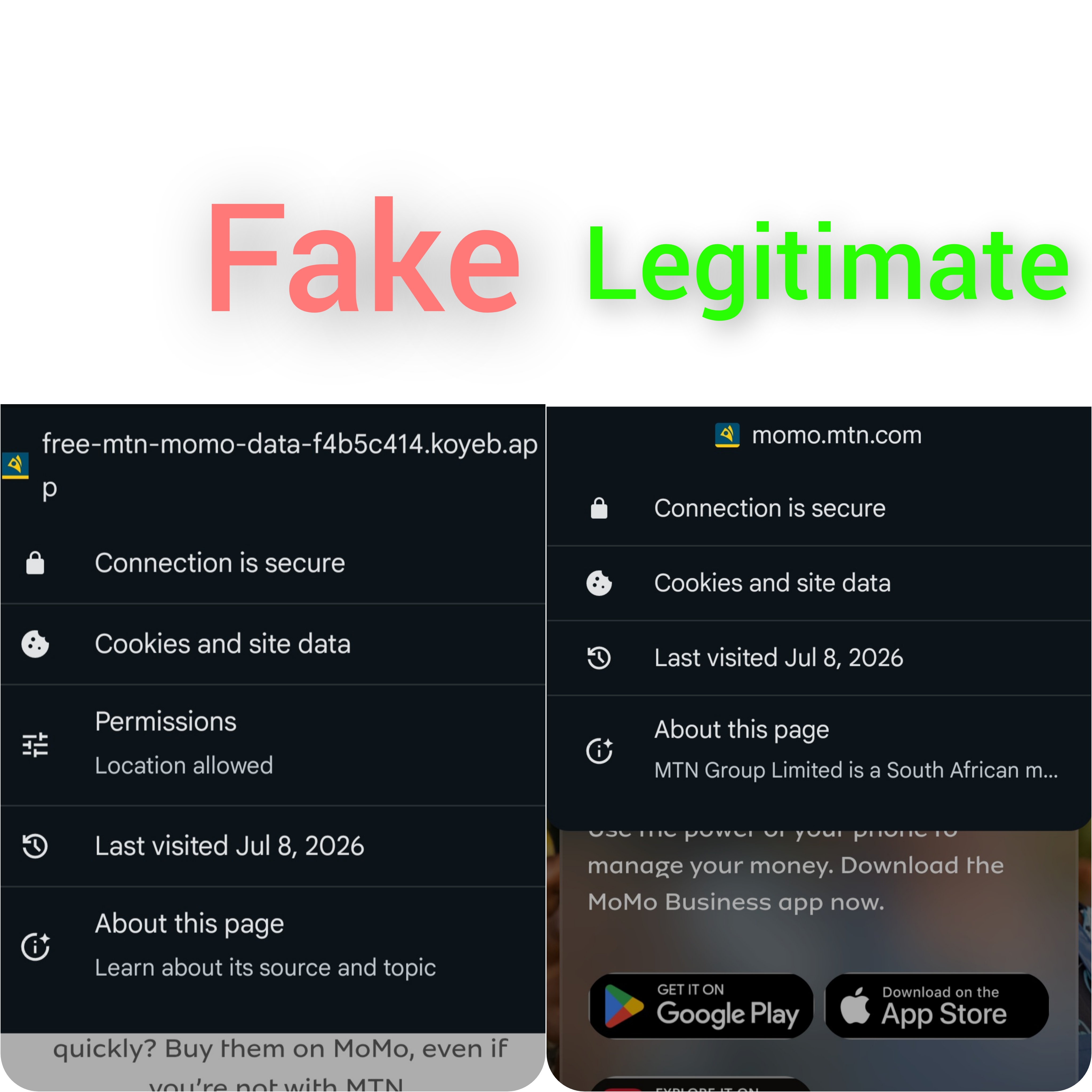
Another important indicator of a phishing attempt is the request for unnecessary permissions, especially on mobile devices. A legitimate login or payment page does not require access to sensitive device features such as the camera, microphone, storage, or location. When a website requests such permissions without a clear and valid reason, it should immediately raise concern. These permission requests are often used to collect additional data or exploit device capabilities beyond the user’s awareness. Denying such requests and exiting the site is the safest course of action when encountering this behavior.
Phishing attacks are frequently combined with social engineering tactics, particularly in mobile money environments. Users may receive messages claiming that a transaction was made in error and that immediate action is required to reverse it. In other cases, attackers send fake payment confirmations accompanied by malicious links or impersonate customer support representatives in phone calls. These tactics are designed to create urgency and pressure, reducing the likelihood that the victim will carefully verify the situation. The objective is to trigger quick reactions rather than informed decisions.
Maintaining strong security practices significantly reduces the risk of falling victim to phishing attacks. Users should consistently verify URLs before interacting with any website, avoid clicking on suspicious or unsolicited links, and depend only on official and verified sources when accessing online services. Sensitive information such as PINs and one-time passwords should never be shared under any circumstances.